here you goThings I’ve made, read and saved — shared here.

Archive

9,609 entries: 53 from X, 8,925 from Pinboard, saved 1998 to 2026.

Browse by tag, site, author, folder or language

Tags

Sites

Authors

Folders

Languages

19 entries#markdown ×

This week

This month

February 2026

2025

Markdown and the Slow Fade of the Formatting Fetish

ia.net

Over the years, the format used in writing apps started to change from proprietary .docx to .pages and .pdf to the innocuous syntax called Markdown. Outside the tech field, few are familiar with its name, and yet more and more people use it unknowingly.9

Today, Slack, Discord, WhatsApp, Google Chat, Teams, and Trello, among others, use Markdown syntax, at least partially. Seeing weird characters when you copy-paste from AI? That’s because ChatGPT, Claude, Gemini, DeepSeek, and others use Markdown to format their responses. GitHub, Reddit, and similar tech-oriented sites have been using their own Markdown flavors for years now.

ia.netPinboardPermalink

#markdown

2024

unified

unifiedjs.com

Content as structured data

We compile content to syntax trees and syntax trees to content.
We also provide hundreds of packages to work on the trees in between.
You can build on the unified collective to make all kinds of interesting things.

2023

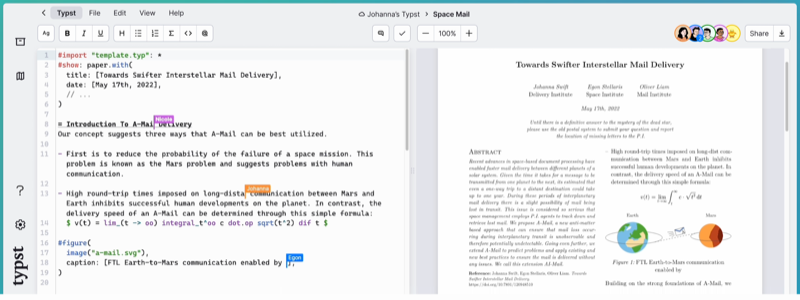
typst

Introduction

Typst is a modern typesetting language. See this post for a good intro to the topic -- Exploring Typst, a new typesetting system similar to LaTeX - jreyesr's blog; via. See Typst as a Language

Typst

Typst makes big strides; Sep 2026.

Pandoc

A New Typst Template for Pandoc

Example usage


Rheo? is an typesetting and static site engine for Typst.

See also: nota, latex, context, pandoc

notes#markdown#typesetting#typst

Obsidian

Obsidian is a knowledge base that works on top of your local folder of plain text files. Think of logseq and roamresearch.

Obsidian Graph
Obsidian Graph, manually exported from the Graph View as a screenshot - 2024-04-05

How I'm using Obsidian

  • This website is orgnized using markdown
  • I open up the content directory as a vault (obsidian word).
  • I edit them as any other markdown file
  • The hotkeys and / commands are handy in writing
  • I use WikiLinks (double square brackets) to link to peer pages, these are converted to HTML links via the Python-Markdown extension. wikilinks = WikiLinkExtension(base_url="/", end_url=".html")

Templates

Creating and using templates in Obsidian.

Use case: I write my notebooks and posts using markdown and ergo obsidian. The two types have a frontmatter that looks like this (taken from this document):

---
title: Obsidian
kind: notebook
date: 2023-04-12
tags:
  - pkm
  - markdown
  - text-editor
---

Using instructions from the templates page, i created _obstemplates directory and added notebook.md as a file with the following content:

---
title: {{title}}
date: {{date}}
kind: post
description: TODO
tags:
  - TODO
---

To use this template, use the "ribbon" and select "Insert Template". voila!

Plugins

I'm using these plugins

  • dataview
  • emoji-toolbar
  • style-settings
  • periodic-notes
  • table-editor

Alfred Workflows

Obsidian published websites

Examples of interesting obsidian published websites

Templater


Related:

Introducing My Knowledge Lakehouse

notes#markdown#pkm#text-editor

2022

Markup languages

djot

"Djot is a light markup syntax. It derives most of its features from commonmark, but it fixes a few things that make commonmark's syntax complex and difficult to parse efficiently. It is also much fuller-featured than commonmark, with support for definition lists, footnotes, tables, several new kinds of inline formatting (insert, delete, highlight, superscript, subscript), math, smart punctuation, attributes that can be applied to any element, and generic containers for block-level, inline-level, and raw content. "

  • by John MacFarnale of pandoc
  • implemented in Lua
  • custom pandoc reader
  • custom pandoc writer
  • luarocks install djot

Idyll

"Idyll can be used to create explorable explanations, write data-driven stories, and add interactivity to blog engines and content management systems. The tool can generate standalone webpages or be embedded in existing pages."

  • expands on markdown syntax
  • implemented in javascript
  • github
  • gallery
  • variables declared like -- [var name:'x' value:10 /]
  • datasets -- [data name:'myData' source: 'myData.csv' /]

Articles


See also Static Site Generators

notes#markdown#markup-language

2020

Static Site Generators

Some notes and links on Static Site Generators (SSG).

A "hello world" program for the 2010's (and 2020s).

Articles

Why You Should Write Your Own Static Site Generator; Nov 2023.

The understated innovation of static site generators

Smaller Static Sites with New Formats - 2022. Optimizing Fonts, Images etc using newer formats and tools.

Elements Of a Great Markup Language

"... static site generator which takes a bunch of input documents, a custom conversion script, and outputs a bunch of HTML files."

low touch - hosted SSG

Desktop SSG

Publii - Open-Source CMS for Static Site

Static site generators

roman-kashitsyn/mmapped.blog that powers mmapped.blog is a Go program that implements? subset of latex and converts it to HTML. See the "blogware" source code.

Kitten: Home A 💕 Small Web development kit. Build using #html, #css , and #javascript . Progressively enhance with Streaming HTML and #htmx

jemdoc -- light text-based markup language designed for creating websites. Based on Asciidoc. Has #latex support for math, but the equations are rendered as static images, not MathJax etc.,. Appears to be popular with academics.

JBake - Java based open source static site/blog generator -- this is actually surprisingly smooth.

nuex/zodiac: A static website generator written in awk and sh.

Makefile-Based Static Website Generator

Makefile and discount powered blog

Static site generator with rsync and lowdown - Roman Zolotarev [SSG]

kambrium/dssg: A static site generator written in D

sysgears/grain: Static Web Site Building Framework For Groovy that uses ASCIIdoctor

Static site generators need less rigid content APIs | Hacker News

Hammer for Mac 6.9 - Available Now

jeremycw/mfbg: Mother F*ing Blog Generator -- a Makefile + pandoc.

Home - Styx Static Site Generator -- The Purely Functional Static Site Generator. Styx is a functional static site generator based on the Nix package manager.

srid/rib-sample: Sample site for the Rib static site generator

Pelican 4.2.0 — Pelican 4.2.0 documentation with m.css looks very good.

bastibe/org-static-blog: A static site generator using org-mode

Lume, the static site generator for Deno - Lume

jorge  is a personal (small + opinionated) site generator inspired by Jekyll, written in Go, with org-mode and markdown support.

Static site generator for Django - Django Distill

Headless SSG

Deployments

surge.sh:

Examples of surge.sh sites:

Commenting systems

Search for static sites

Not exactly SSG

Crazy / Fun static site generators

Typst

Rheo? is an typesetting and static site engine for Typst.

notes#markdown#markup-language#static-sitegen

Pandoc

Pandoc is a program that converts between various text markup formats.

Pandoc allows you to customise the output via extensive command line arguments and by templates.

My projects related to Pandoc

  • Semantic CSS for Pandoc -- an attempt at finding and using various semantic Cascading Style Sheets with Pandoc'd default HTML rendering.
  • Pandoc + Missing.css -- is instructions on how to use missing.css to style pandoc output. Summary: you will have to wrap the $body$ variable in <main> </main> tag.

Writing Papers

Guides on using Pandoc to write books

Editors

Customising pandoc

These are some of the examples of users customising pandoc to output LaTeX, HTML to their taste and requirements.

My own attempts are here:

Templates

Filters

Pandoc filters can be written in Haskell which modify the document structure programmatically. These are some of the user written filters that are instructive:

Exporters

Ox-pandoc is an exporter that translates Org-mode file to various other formats via Pandoc.

Markdown to InDesign; Pandoc now ships with a writer able to produce an ICML file from any Pandoc-supported input file format.13 ICML is the document format of Adobe InCopy; Dec 2015.

Books written using pandoc

See also

  • Laika -- Text Markup Transformer for sbt and Scala applications, transforming markdown and reStructuredText to HTML and PDF
  • lise-henry/crowbook -- converts books written in Markdown to HTML, LaTeX/PDF and EPUB.

Styling

Sites built using Pandoc

Book publishing

  • [output.pandoc.profile.pdf] + output-file = "output.pdf" + to = "latex"

Using with weasyprint

From an HN thread:

It's even possible to replace (Xe)LaTeX with weasy, a Python HTML-to-PDF converter. It supports two-colums via CSS, automatic CSS hypens, CSS page counters and embedding SVGs. I just needed an HTML header with CSS in the markdown file.

$ pandoc --filter pandoc-citeproc --csl ieee.csl --bibliography=paper.bib --smart --normalize -f markdown+multiline_tables+inline_notes -t html5 -V margin-top:0.5in -V margin-bottom:0.5in -V margin-left:0.5in -V margin-right:0.5in -o output.html input.md
$ python3 -c "from weasyprint import HTML; HTML('output.html').write_pdf('output.pdf', presentational_hints=True)"

For LaTeX-style math equations I added mathjax-pandoc-filter as filter to the pandoc args:

--filter ~/node_modules/.bin/mathjax-pandoc-filter -Mmathjax.centerDisplayMath -Mmathjax.noInlineSVG

SVG2PDF

^b5a0d2

If you are trying to convert an HTML page to PDF using Pandoc, and the HTML page has svg drawings (e.g.: this excellent post - The Big LLM Architecture Comparison by Sebastian Raschka), pandoc might choke on it unless you have rsvg-convert installed (on macOS: brew install svg2pdf). As you can see from this commit that added passing svg through rsvg-convert command to covnert it into a png file.

also had to install the latex svg package.

even after this the PDF generation failed with:

pdflatex: major issue: User/administrator updates are out-of-sync.                                                                                                    Error producing PDF.
! Package svg Error: File `1e7afdcc9b596b58d739c7d01b66c47cb52f6c23_svg-tex.pdf                                                                                       ' is missing.
                                                                                                                                                                      See the svg package documentation for explanation.
Type  H <return>  for immediate help.                                                                                                                                  ...
                                                                                                                                                                      l.140 ...dcc9b596b58d739c7d01b66c47cb52f6c23.svg}}

notes#markdown#pandoc

2019

Markdown

Why Use plain text (like markdown) to write things? Dr Kieran Healy has a nice website explaining how

The Markdown Guide for the Perplexed

Desktop Tools

I MarkEdit as the default app to open .md files on MacOS. Otherwise it is painful to wait for XCode to open it. MarkEdit is quite fast and nimble. I have also used Typora before for the same thing before.

  • Glow terminal based markdown reader.
  • markdown-service-tools are a collection of OS X Services designed to make writing Markdown text that much easier.
  • PanWriter Markdown editor for macOS, Windows and Linux.
  • MarkdownDown -- "Convert any webpage to a clean markdown w/ images downloaded."

Web tools

uselink — Turn any doc into a living, shareable link

Wrappers

Foliant

Foliant is a all-in-one documentation authoring tool. It lets you produce standalone documents in pdf and docx, as well as websites, from single Markdown source. Foliant is a higher order tool, which means it uses other programs to do its job. For pdf and docx, it uses Pandoc, for websites it uses MkDocs. Foliant preprocessors let you include parts of documents in other documents, show and hide content with flags, render diagrams from text, and much more.

Who Is Foliant for?

You'll love Foliant if you:

  • need to ship documentation as pdf, docx, and website forms
  • want to use Markdown with consistent extension system instead of custome syntax for every new bit of functionality
  • like reStructuredText's extensibility and Asciidoc's flexibility, but actually would rather use Markdown
  • want a tool that you can actually write custom extensions for without dealing with something as overengineered as Sphinx
  • have documentation spread across many repos and want to reuse parts between documents

pp - A generic Preprocessor (with Pandoc in mind)

PP is a text preprocessor designed for Pandoc (and more generally Markdown and reStructuredText).

pp now implements:

  • macros
  • literate programming
  • GraphViz, PlantUML and ditaa diagrams
  • Asymptote and R figures
  • Bash, Cmd, PowerShell, Python, Lua, Haskell and R scripts
  • Mustache

GitHub - drasimwagan/mdv: MDV — a Markdown superset for documents, dashboards, and slides with embedded data and visualizations. HTML + PDF export, live preview, VS Code extension. · GitHub

Markdown to PDF conversion

HTML to Markdown

Show HN: HTML-to-Markdown – convert entire websites to Markdown with Golang/CLI | Hacker News -- a few tools mentioned, like jina.ai

markdown.new - Markdown for Agents | Cloudflare-Powered URL to Markdown

Markdown Styling

ReMarkdown — HTML that looks like Markdown text

Command line tools

Python One liner:

python3 -m markdown -x markdown.extensions.fenced_code -x markdown.extensions.codehilite index.md > index2.html
mq '.h' demo.md
... lists all the h elements .. 

Browser tools

Python Markdown

This is intersting to me because i use Python Markdown to render this site, and use many built-in and third party extensions.

Libraries

Mistune for Python

: * claims to be fastest markdown renderer for Python

  • mistune.markdown('I am using **mistune markdown parser**')
  • options are configurable
  • contribs

lowdown — simple markdown translator is a Markdown translator producing HTML5 and roff documents in the ms and man formats. Written in C. "Beyond the basic Markdown syntax support, lowdown supports the following Markdown features and extensions: autolinking, fenced code, tables, superscripts, footnotes, disabled inline HTML, “smartypants”, metadata, commonmark (in progress). You can control which parser features are used by using the -d (disable feature) and -e (enable feature) flags."

Gottox/smu: simple markup - markdown like syntax

syntax-tree/mdast: Markdown Abstract Syntax Tree format; see also syntax-tree/unist: Universal Syntax Tree used by unifiedjs

lkesteloot/teamten's markdown parser in Java is very easy to understand how the parsing works. It is a good read!

wernsey/d.awk: An Awk script to generate documentation from Markdown comments in C, C++, Java, JavaScript, C# source code.

Markdown for the component era | MDX MDX allows you to use JSX in your markdown content. You can import components, such as interactive charts or alerts, and embed them within your content. This makes writing long-form content with components a blast. 🚀

Competing mark-up languages

notes#markdown

2018

2015

Markdeep

casual-effects.com

Markdeep is a technology for writing plain text documents that will look good in any web browser. It supports diagrams, common styling conventions, and equations as extensions of Markdown syntax. It is free, easy to use, and doesn't need a plugin or Internet connection.

2013

2011