here you goThings I’ve made, read and saved — shared here.

Archive

9,686 entries: 92 from X, 8,928 from Pinboard, saved 1998 to 2026.

Browse by tag, site, author, folder or language

Tags

Sites

Authors

Folders

Languages

Showing 3,851–3,900 of 9,686

2020

Org Mode

In some users view, org-mode is itself reason enough to learn to use emacs, even if you don't use it for anything else (programming).

Zettelkasten

GitHub - nobiot/Zero-to-Emacs-and-Org-roam: Step by step guide from zero to installing and setting up Emacs and Org-roam on Windows 10

Org mode for writing web documents

While Org-mode is used by many people as an organizer, TODO list tracker, journal etc., I'm interested in it as primarily as a markup language that can be extended. This is is primary area where I want to become good at vis-a-vis orgmode (Jan 2020).

web document friendly CSS themes

See my Org-simple CSS theme page.

Blogging with Org mode

Links

Org Libraries

My notes

  • the metadata tags at the top of the document start with #+TAG: value format. That is "hash plus tag colon value" format.
  • use the - character for un numbered lists
  • what are the keyboard shortcuts to type blocks like EXAMPLE and CODE. Typing C-c C-, brings up a menu using which i could select an src block or an example block.

notes#emacs#programming#tools#writing

Emacs Notes

This page is a journal of my experiments with emacs. In November of 2008, I decided to use emacs for all my text editing purposes, after long been convinced of Emacs's power and utility in editing programs and texts. At this time, I consider myself to be an adequate user of vim, emacs and TextMate. My goal is to teach myself emacs in an auto-didactic manner and make a note of the questions I had and the solutions I found for them. I hope this serves as a reminder for myself on a later date.

Note: All the instructions on this page, unless otherwise noted, are tested on Mac OS X systems and Aquamacs.

Python + Emacs

Install rope, ropemode, pep8 and pyflakes.

$ pip install ropemode pep8 pyflakes

Install yasnippet-bundle and pymacs in emacs:

M-x package-install yasnippet-bundle

References:

Emacs Client on Mac OS X

Here is a nice AppleScript created by Brian McCallister that provides proper emacsclient behaviour. Update: this script launches a "terminal" window, which is an annoyance.

Navigation

Go to Shortcut


Goto line M-gg. End of the buffer M-x > End of the line C-e Beginning of the line C-a

Editing

Do what Shortcut


zap-to-char (say e) M-z e merge multiple lines M-^ (alt-shift-6)

Customising emacs

Customizing emacs is done through editing ~/.emacs file. Though, if you are using emacs-starter-kit you will be putting files under emacs.d.

Adding a new key binding.

You can bind any operation that you can do in emacs to a set of key strokes. For example: the emacs-git integration -- magit can be invoked by typing M-x magit-status. But, this gets tiring after a while, so you may want to assign a short cut. Short cuts in Emacs start with 'C-c'. You have to decide what comes after C-c. In this case, I chose magit-status.

Add the following lines to your .emacs file:

;; C-c ms Magit-status
(global-set-key (kbd "C-c ms") 'magit-status)

The first line is the comment (a good practice) and the second line tells emacs to call magit-status when you press C-c ms.

After editing a custom function in .emacs file how do I reload it?

Select the block of code that you want to reload and hit C-x C-e (evaluate). This can also be achieved by positioning the cursor (point in emacs lingo) after the last closing parentheses of the function and typing C-x C-e.

Editing ConTEXt files with Emacs

Install ConTEXt. Install AUCTEX using port (on mac).

$ sudo port install auctex

Active AucTEX by putting this (load "auctex.el" nil t t) in .emacs.

Auto completion.

Install YASnippet to get auto-completion on emacs. To use YASnippet, type in the trigger word and press TAB. For example, typing def and pressing TAB will give you

    def name():
        """
        """

The next tab press allows you replace the default function name with your own, with subsequent tabs taking you to the parameter list, docstring and finally the body of the function

What programming font?

This page has a nice collection of free programming fonts optimized for editing code over long durations of code. The rule of thumb to remember while selecting a programming font is: it should be a fixed width font. This is especially true in languages like "Python":Python where indentation is essential in understanding the code flow.

I currently use Monaco, a font that is available on Mac OS X set to size 10.

Emacs Muse Notes

Muse tutorial.

Instead of editing the muse-latex.el and muse-book.el files, just use customize on the muse-latex-header and muse-book-latex-header variables. Upgrades to new versions of muse will be much smoother.

Emacs + Git integration

Main entry point M-x magit-status (bound to C-c ms). Go to the magit buffer *magit: PRJNAME* and press tab on the line containing the filenames. The modified text will expand underneath. Press TAB again collapse.

Press g in the magit buffer to refresh git status. or execute M-x magit-status from one of the repository files.

Removing trailing white spaces

The emacs manual defines tells us that setting buffer variable show-trailing-whitespace to t will show trailing white spaces.

(setq show-trailing-whitespace 't)

Paste the above line into the current emacs buffer and evaluate the statement by pressing C-x C-e. Delete the white spaces with M-x delete-trailing-whitespace

Check to see if your emacs configuration is correct.

Source

emacs -q --eval '(condition-case err (progn (load "~/.emacs") (kill-emacs 0)) (error (kill-emacs 1)))'

Shut down emacs gracefully from the command line

emacsclient -n -e '(kill-emacs)'

How to ? Command


Create a Directory from within emacs M-x make-direct ory

[Spell M-x ispell check](http://www.gnu.org/software/emacs/manual/html_no de/emacs/Spelling.html)

Undo C-x u or C-_

Describe key C-h k

Describe bindings C-h b

Describe functions C-h f

Emacs Server/Client

See Running emacs as daemon.

Setting up SLIME

Movie showing how to setup slime, swank, sbcl and emacs

Some notes:

check out slime and put it somewhere convenient, ie., $HOME/elisp/slime.

Put the following lines in .sbclrc

(require :asdf)
(push "/Users/pradeep/elisp/slime/" asdf:*central-registry*)

Load swank in sbcl:

$ sbcl
(asdf:oos 'asdf:load-op :swank)
(setf swank:*use-dedicated-output-stream* nil)
(setf swank:*communication-style* :fd-handler)
(swank:create-server :dont-close t)

Installing emacs24

What's new in emacs 24?

git clone git://git.savannah.gnu.org/emacs.git
cd emacs
sudo apt-get install libxpm-dev
sudo apt-get install libgif-dev
sudo apt-get install libtiff-dev
./configure
make
sudo make install

My initial impression of emacs24 is that it feels much faster compared to the stock emacs-snapshot available on ubuntu maverick.

Understanding Emacs

Essays on Emacs

Interesting modes

Help

Interesting reads

Dotemacs

Distributions

Packages

Information well / emacs people

TODO

Is it possible to show the keybindings in the modeline?

Use case: I have configured 'Fn' keys for mode specific actions, but do not remember them, or I want emacs to prompt me to use them.

Starting point: http://www.emacswiki.org/emacs/ModeLineConfiguration

Random tips

  • Use M-x new-frame create a new Emacs window associated with the current Emacs instance. Great for organising, or when running Emacs on a multi monitor setup!

CIDER

Journal

Fri, January 3, 2020 : Trying out Swaroop's Rangoli-emacs

Sat, Jan 4, 2020 : if you see emacs ssl certificate problem error when installing a new dependency (zencoding-mode in my case), try to launch emacs from the terminal emacs -nw instead of the graphical mode. This finds the root certificates.

Thu, Jan 16, 2020 : settings up mac os x and iterm2 for emacs. what I want is to be able to:

1. on the laptop: use the `command` key as `option` and vice versa, so that it is similar to the "regular keyboard" (I use the Das Keyboards at work and home)
2. in ther iterm2 window, be able to use left-alt key as `meta`. so that when I type `left-alt-m` I get `Meta-m`.

notes#emacs#lisp#text-editor

jq

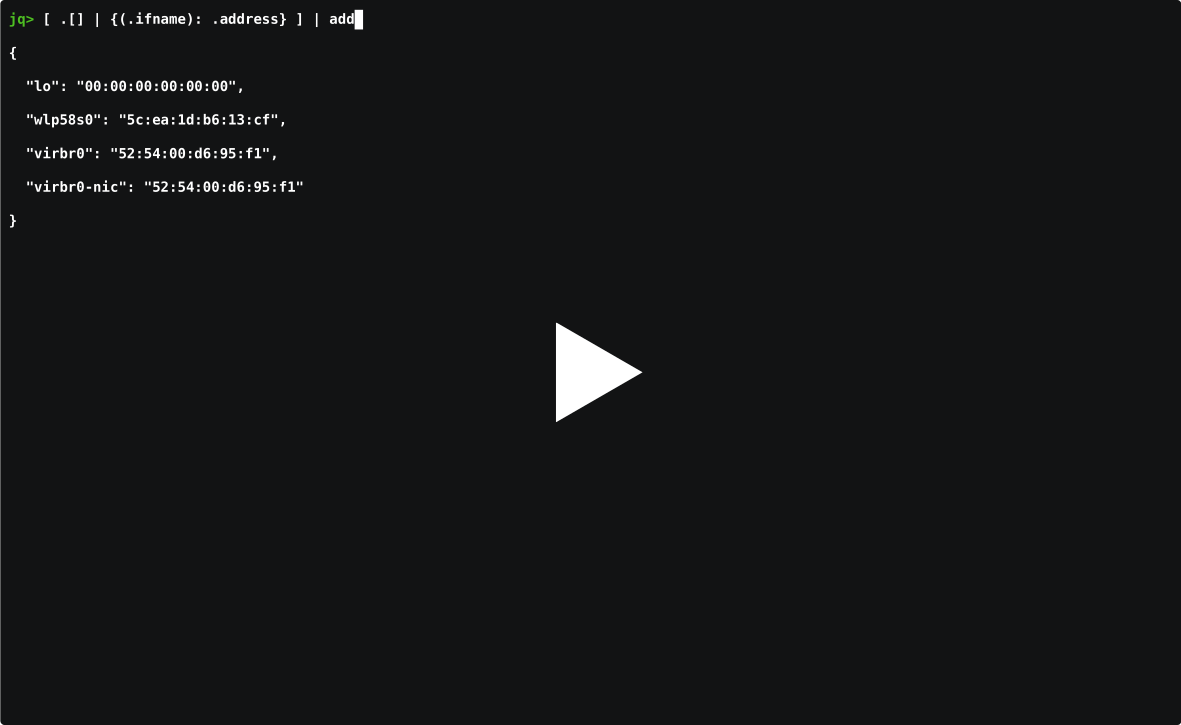
"A post announcing the 1.0 release of pq, my Rust command-line protobuf deserializer"

asciicast


Associated programs

JSONata and gnata

  • Lightweight query and transformation language for JSON data
  • Inspired by the location path semantics of XPath 3.1
  • Sophisticated query expressions with minimal syntax
  • Built in operators and functions for manipulating and combining data
  • Create user-defined functions
  • Format query results into any JSON output structure

Read gnata blog post (Mar 2026),

gron

gron - "make JSON greppable". brew install gron

▶ **gron** "https://api.github.com/repos/tomnomnom/gron/commits?per_page=1" | fgrep "commit.author"
json[0].commit.author = {};
json[0].commit.author.date = "2016-07-02T10:51:21Z";
json[0].commit.author.email = "mail@tomnomnom.com";
json[0].commit.author.name = "Tom Hudson";

Jo

See also: jo, a tool to write JSON in the shell. Example usage:

$ jo -p name=jo n=17 parser=false
{
    "name": "jo",
    "n": 17,
    "parser": false
}

jc

2020-06-01: https://github.com/kellyjonbrazil/jc This tool converts the output of popular command-line tools and file-types to JSON. This allows piping of output to tools like jq.

Example:

$ ls -l /usr/bin | jc --ls | jq '.[] | select(.size > 50000000)'
{
  "filename": "docker",
  "flags": "-rwxr-xr-x",
  "links": 1,
  "owner": "root",
  "group": "root",
  "size": 68677120,
  "date": "Aug 14 19:41"
}

jtbl

2020-06-01: https://github.com/kellyjonbrazil/jtbl -- A simple cli tool to print JSON and JSON Lines data as a table in the terminal

Example:

$  cat cities.json | jtbl
  LatD    LatM    LatS  NS      LonD    LonM    LonS  EW    City               State
------  ------  ------  ----  ------  ------  ------  ----  -----------------  -------
    41       5      59  N         80      39       0  W     Youngstown         OH
    42      52      48  N         97      23      23  W     Yankton            SD
    46      35      59  N        120      30      36  W     Yakima             WA
    42      16      12  N         71      48       0  W     Worcester          MA

jello - Filter JSON and JSON Lines data with Python syntax

2020-06-01: jello

jid - json incremental digger

2020-06-05: simeji/jid

jj - JSON Stream editor

2023-05-26: tidwall/jj)

fq - jq for binary formats

2023-06-03: wader/fq: jq for binary formats - tool, language and decoders for working with binary and text formats It was originally designed to query, inspect and debug media codecs and containers like mp4, flac, mp3, jpeg. But has since then been extended to support a variety of formats like executables, packet captures (with TCP reassembly) and serialization formats like JSON, YAML, XML, ASN1 BER, Avro, CBOR, protobuf. In addition it also has functions to work with URL:s, convert to/from hex, number bases, search for things etc.

jaq

jaq aims to support a large subset of jq's syntax and operations.

Goals:

  1. Correctness
  2. Performance
  3. Simplicity

faq

jzelinskie/faq: Format Agnostic jQ

faq is a tool intended to be a more flexible "jq", supporting additional formats. The additional formats are converted into JSON and processed with libjq. Supported formats: BSON, Bencode, JSON, TOML, XML, YAML.

jf

2024-04-28 say4n/jf: flatten them json

$ jf -f foo.json
{"foo.bar.0":"baz"}

$ jf --filename foo.json
{"foo.bar.0":"baz"}

$ echo '{"foo": {"bar": ["baz"]}}' | jf
{"foo.bar.0":"baz"}

See also

cube2222/jql: Easy JSON Query Processor with a Lispy syntax in Go


glomRestructuring data, the Python way.

from glom import glom

target = {'a': {'b': {'c': 'd'}}}
glom(target, 'a.b.c')  # returns 'd'

mq – jq-like tool for Markdown processing

mq '.h' demo.md
... lists all the h elements .. 

The Zed Project | Zed


Ecosystem of jq adjacent tools.

notes#json

D3.js

See also: Visualisation

notes

Cascading Style Sheets

My CSS Hacks

Learn

Learning CSS by playing

Frameworks

There are lightweight alternatives to commonly-used libraries. Some do away with compatibility with old browsers, some are less bloated, and some just do less.

Functional CSS

Programming history leading resulting in "functional" CSS -- CSS Utility Classes and "Separation of Concerns"

In defense of Functional CSS | Mike Crittenden's Blog

Functional CSS frameworks

Javascript

StyleX is a JavaScript syntax and compiler for styling web apps.

StyleX combines the strengths and avoids the weaknesses of both inline styles and static CSS. Defining and using styles requires only local knowledge within a component, and avoids specificity issues while retaining features like Media Queries. StyleX builds optimized styles using collision-free atomic CSS which is superior to what could be authored and maintained by hand.

Tools

CSS Variables

Colors

OKLCH Color Picker & Converter; OKLCH in CSS: why we moved from RGB and HSL

Typography

use Modern Font Stacks -- use the System font stack "The fastest fonts available. No downloading, no layout shifts, no flashes — just instant renders."

Markdown

ReMarkdown — HTML that looks like Markdown text

Flexbox

Semantic css

My favorites in particular order are: water.css, pico.css, mvp, though matcha looks excellent (May 2024), and I'm going to try it going forward.

  • matcha.css | Drop-in semantic styling library in pure CSS; the site also has a "preview website" feature - which, given a URL, will apply the semantic CSS and let you preview the site. It also has a custom build feature that allows you to select exactly which elements you want to apply these styles + customize colors. Excellent library and website!
  • missing.css -- The goal of missing.css is to reduce needed intervention in HTML. It lets authors
    • start with a good out-of-the-box experience,
    • customize it easily, even create multiple themes,
    • build common components using plain, semantic HTML,
    • create unique sites by applying utility classes as needed.
  • Carpetsmoker/hello-css: A CSS template focused on readability
  • Water.css -- is a just-add-css collection of styles to make simple websites like this just a little bit nicer..

Minimal CSS

Javascript styling system

StyleX "JavaScript syntax and compiler for styling web apps." by Meta.

StyleX combines the strengths and avoids the weaknesses of both inline styles and static CSS. Defining and using styles requires only local knowledge within a component, and avoids specificity issues while retaining features like Media Queries. StyleX builds optimized styles using collision-free atomic CSS which is superior to what could be authored and maintained by hand.

Cool stuff / experiments

Classic CSS

Good CSS examples

Tips and tricks

Typographic CSS

Introducing TODS – a typographic and OpenType default stylesheet | Clagnut by Richard Rutter

notes#css#web