Notes
Notes from Phoenix - A High Performance Open Source SQL Layer over HBase Nov, 2013 and Apache Phoenix the evolution of a relational database layer over HBase Jun 30, 2015 slides. Both talks by James Taylor
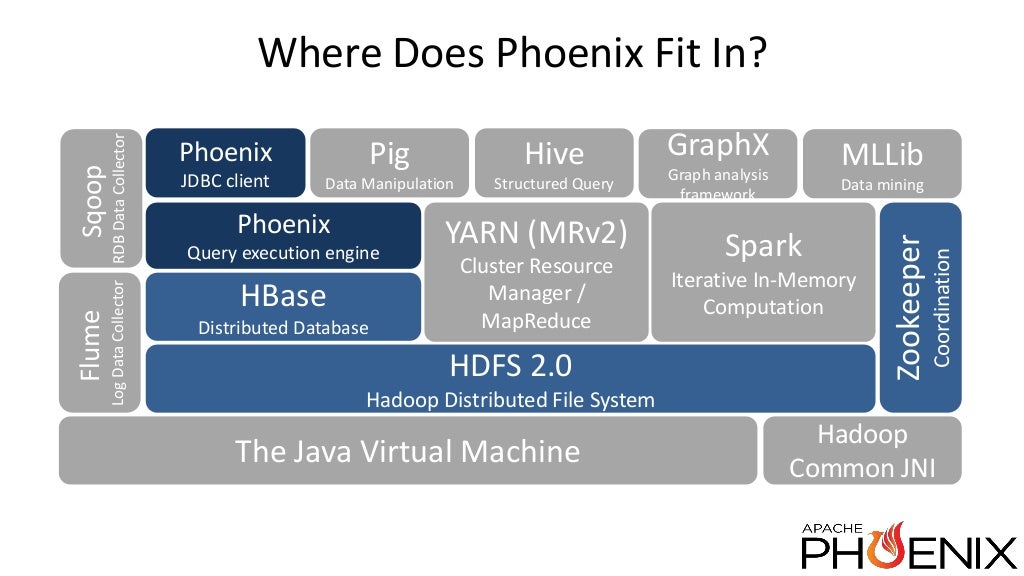
Phoenix is a High performance SQL Engine over HBase data
Query Engine
Metadata repository
Compare to Impala
Targets low latency application (eg: web applications)
Open Source -- top level Apache project
Regular JDBC driver
- metadatadata + regular jdbc API
phoenix demo
- 10 years of Fortune 500 stocks
- 30M rows
- Single AWS node
- interactive visual query for stock prices ...
What is Hbase
- Runs on HDFS
- K/V store -- distributed, sorted, map
- low level APIs -- get, put values given row key & scan over range given start and stop row keys.
Why use HBase?
- you have lots of data. scale linearly. shards automatically. data is split and redistributed
- no transactions out of the box.
- you need strict consistency.
- hbase handle incremental data changes by building log structure merge trees
Why use Phoenix?
SQL
reduces the amount of code users need to write.
Performance optimisations transparent to user
- aggregation
- skip scanning
- secondary indexing
- query optimisation
Leverage existing tooling around SQL
- SQL Client (
bin/sqlline.py) - OLAP engine. eg: Pentaho. Kylin?
- SQL Client (
Phoenix versus Hive performance
- Phoenix (key filter) >> phoenix (full table) > >> Hive over HBase
- Hive and Impala have similar perf. Does not understand the structure of row-keys
Use cases
Data archival
- from oracle into HBase while maintaining salesforce developer API
Platform monitoring
Why is it important?
- scalable, low latency app development starts with Phoenix
- Phoenix worries about physical scale and fast performance so that app developers don't have to
- Looks, tastes, feels like SOQL to force.com developer
Archival problem set
- Field history tracking grows unbounded. call centers call individual change. No data is deleted for 8.5 years.
- Enterprise customers require long term storage of 'cold' data.
- Data retention policies can require of data to be kept around
Archive pilot demonstration
- insret data from Oracle into Phoenix
Monitoring use case
- security, compliance and audit
- product support and "Limits analysis"
- product usage and management (roll up into aggregates)
- Identity fraud
Phoenix under the hood
- aggregate co-processor on severside per region, parallelised.
- returns only the distinct set of features
- preserves network bandwidth
- client does final merge-sort.
- client returns the result as a JDBC result
Roadmap (Nov, 2013)
- Apache incubator
- Joins
- multi-tenant tables
- monitoring and manageent
- cost-based query optimizer
- sql OLAP extensions
(WINDOW, PARTITION OVER, RANK) - Transactions
State of the union (Jun 2015)
Runs TPC queries
Supports JOIN, sub-queries, derived tables
Secondary indexing strategies
- Immutable for write-once/append only data (eg: Log data.. has time component). There is no incremental secondary index.
- Global for read-heavy mutable data (co-processors on the server side keep indexes in sync with data tables). A second HBase table is created that is ordered according to the columns you are indexing. Optimiser will use this table if it deems this table to be more efficient.
- Local for write-heavy mutable or immutable data. Custom load-balancers. All the writes are local. The writes can be done on the same region servers.
statistics driven parallel execution -- background process in hbase. allows the user to optimze queries. uses equidistant keys in region to collect stats.
Tracing and metrics for monitoring and management -- better visibility into what's going on. Uses Apache HTrace. Collect data across scans into stats table. Then query for bottlenecks -- index maint etc.,
Join and subquery support
Left/Right/Full outer Join; cross join
additional: semi join; anti-join
Algorithms: hash-joni; sort-merge-join
Optimizations:
- Predicate push-down
- FK-to-PK join optimisation
- Global index with missing data columns
- Correlated subquery rewrite
TPC - benchmarking suite
HBase 1.0 support
Functional indexes -- 4.3 release of Ph. Indexing on expression not on column.
SELECT AVG(response_time) FROM SERVER_METRICS
WHERe DAYOFMONTH(create_time)=1
Adding the following index will turn it into a range scan:
CREATE INDEX day_of_month_idx
ON SERVER_METRICS(DAYOFMONTH(create_time))
INCLUDE(response_time)
- User defined functions -- extension points to phoenix. Define the metadata of the fun (input, output) params.
CREATE FUNCTION WOEID_DISTANCE(INTEGER, INTEGER)
RETURN INTEGER AS 'org.apache.geo.woeidDistance'
USING JAR '/lib/geo/geoloc.jar'
usage:
SELECT FROM woeid a JOIN woeid b on a.country = b.country
WHERE woeid_distance(a.ID, b.ID) < 5;
This query executes on server side. This is tenant aware, which means.. there is no chance of conflict between tenants defining the same UDF.
Query Server + Thin Driver -- offloads queryplanning and execution to different server(s). Minimises client dependencies
connection string:
Connection conn = DriverManager.getConnection("jdbc:phoenix:thin:url=http://localhost:8765");Union ALL support -- query multiple tables to get single resultset.
testing at scale with Pherf -- define a scenario and deploy pherf to the cluster. It will generate the data and collect the stats. Testing with representattive data size. functional data sets.
MR Index build
Spark Integration .. RDD backed by a Phoe table.
Data built-in functions --
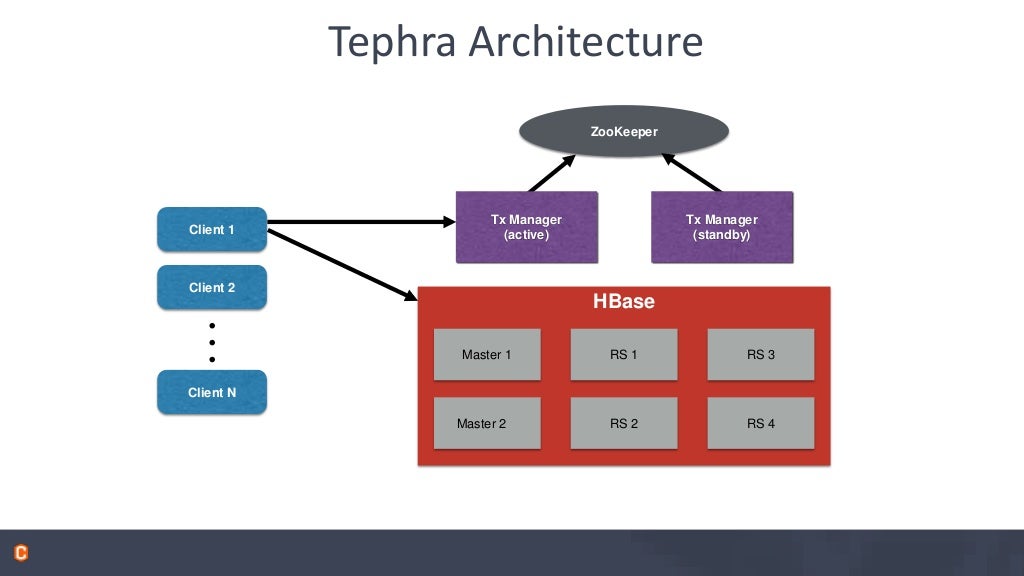
WEEK,DAYOFMONTHetc.,Tranactions -- using http://tephra.io
- supports repeable_read isolation level
- allows reading your own uncommitted data
- Optional -- enable on a table by table basis
- no performance penalty when not used
- Optimistic concurrency control
- no deadlocks or lock escalation
- cost of conflict detection and possible rollback is higher
- good id conflicts are rare: short transactions, disjoin partitioning of work
- conflict detection is not necessary if the data is immutable. ie., write-once/append-only data.
Tephra Architecture
Apache Calcite
- next step for Phoenix
- Query parser, compiler and planner framework
- SQL-92 compliant
- Pluggable cost-based optimizer framework
- Interop with Calcite adaptors
- already used by Drill, Hive, Kylin, Samza
- Supports any JDBC source
- One Cost model to rule them all
Installation
Setting up a local phoenix cluster using Docker
Download and install Docker beta for Mac
We will setup a three node hadoop cluster using this recipe as a template.
git clone git@github.com:kiwenlau/hadoop-cluster-docker.git
cd hadoop-cluster-docker
docker build .
Lot of things fly by ...
Successfully built ed4ece2b19f2
Create hadoop network
sudo docker network create --driver=bridge hadoop
Password:
f678bdfc5918e15a578b909692e6f04a4ef5f730a95ebb0f16da5a30c38354b1